Localization
Missing languages
For the time being Nefertiti user interface is available only in three languages: English (default), German and Spanish. Please, consider extending Nefertiti to cover your own language if it is not covered yet.
The official Sphinx website provides extensive documentation about localization.
Building a single language Sphinx site using the Nefertiti theme does not require any additional effort when the language is already supported by Nefertiti.
On the other hand, building a multilingial Sphinx site requires to translate two different parts: the content of the site, and, only if in use, the header-links and footer-links declared in the conf.py file.
Single language sites
Nefertiti provides the translation of the user interface in a bunch of languages (English, German and Spanish). If your site is written in any of those three languages, the only requirement is to indicate the locale in the language setting in your conf.py file. If it is not given it defaults to en, which corresponds to English.
If your language is not covered, please, consider sending a translation.
Multilingual sites
Multilingual Sphinx sites require two types of translations:
The translation of the Markdown and/or reStructuredText content, and
Only when used, the translation of header-links and footer-links, declared in your
conf.py.
To carry out the translation of the content read about sphinx-intl in the official Sphinx documentation. To translate configurable strings, like those in the header_links and footer_links, use the get_translation function and the babel package.
The content of the conf.py file may look like this:
from pathlib import Path

from sphinx.locale import get_translation

# --------------------------------------------------------------------
# The variable `catalog` refers to the name of the file that will keep
# the messages extracted from this conf.py file. It will be placed in
# the directory `locale/_loc_msgs.pot` using the pybabel cmd line tool.
# Use any name you please so long as it doesn't match the name of any
# of your documents.
catalog = "_loc_msgs"
_ = get_translation(catalog)

language = "en"  # The default language in which the docs are written.
locale_dirs = ['locale/']  # Directory to hold translation catalogs.

html_theme = 'sphinx_nefertiti'

html_theme_options = {
    # Other options have been omitted.
    'header_links': [
        {
            'text': _('Home'),  # 'Home' will go to `locale/_loc_msgs.pot`.
            'link': 'index',
        },
        {
            'text': _('About'),  # 'About' will go to `locale/_loc_msgs.pot`.
            'link': 'about',
        },
    ],
}

def setup(app):
    # Let Sphinx know where to find the translated strings.
    locale_dir = Path(__file__).parent / "locale"
    app.add_message_catalog(catalog, locale_dir)
Do not forget to create the directory that will keep the message catalogs. It is the directory referred to in the locale_dirs. In the example above it is called locale:
mkdir locale
1. Extract messages
To extract translatable messages use pybabel and make gettext.
Messages from your reStructuredText and Markdown files are extracted using
make gettext.Messages from
conf.pyare extracted using thepybabelcommand line tool.
make gettext
pybabel extract . -o locale/_loc_msgs.pot --ignore-dirs=venv
The output of make gettext should be a directory _build/gettext/ with a .pot file per input .rst and .md file. On the other hand, the output from the pybabel command should be a file locale/_loc_msgs.pot containing the strings extracted from conf.py.
2. Create language catalogs
The next step consists of creating a language catalog per language supported by your project. For example, to add Spanish, run the following command:
pybabel init -i locale/_loc_msgs.pot -d locale -l es -D _loc_msgs
It creates a directory locale/es/LC_MESSAGES with the file _loc_msgs.po that contains the messages to translate.
Also, run sphinx-intl to add the documents that have to be translated to Spanish:
sphinx-intl update -p _build/gettext -l es
important
Edit the files created in locale/es/LC_MESSAGES and write their translations. For each message given in a msgid entry there should be a translation in its corresponding msgstr.
3. Compile language catalogs
Once the translations are done, compile the catalogs with the following command:
pybabel compile -d locale -D _loc_msgs
That command creates the catalogs named _loc_msgs.po, from every subdirectory of the locale directory. The .po files that contain the translations from your .rst and .md files will be picked directly by Sphinx when building the static site.
4. Build the static site
Once the translation is ready, build the static site and serve it to check the results:
sphinx-build -D language=es -b html . _build/html/es
python -m http.server -d _build/html/es 8000
The browser must show the Nefertiti interface in Spanish, including the content of your documents in Markdown and reStructuredText.
5. Update translations
Message catalogs have to be updated when there are new entries to translate. If there are new strings to translate in your conf.py file, run the following command to update files _loc_msgs.po:
pybabel update -i locale/_loc_msgs.pot -d locale -D _loc_msgs
Now the new strings are ready to be translated in each locale directory. Edit the files locale/<XX>/_loc_msgs.po to add the translations.
If on the other hand there is new or updated content in your Markdown or reStructuredText, run make gettext again to update the .pot files in _build/gettext, and then run sphinx-intl to update the .po files in your locale directory:
make gettext
sphinx-intl update -p _build/gettext -l es
Now your .po files have got the new content and they are ready for translation. Once the translations are done go back to point 3 and 4, to compile language catalogs and build static sites again.
The localization widget
Nefertiti displays a language widget at the top of the page when the option locales is passed in the html_theme_options, in your conf.py file.
If your site was written in English and translated to German and Spanish, you could have the following locales in your conf.py:
html_theme_options = {
    # Other options have been omitted.
    "locales": [
        ("de", "http://sample-project.org/de/"),
        ("en", "http://sample-project.org/en/"),
        ("es", "http://sample-project.org/es/"),
    ],
}
Build the three sites again and serve the parent directory. In a bash shell with a for-loop you can use the command line tool nftt to query the space-separated list of locales and run sphinx-build with each locale:
for loc in `nftt --show-locales`; do \
    sphinx-build -D language=$loc -b html . _build/html/$loc; \
done
python -m http.server -d _build/html 8000
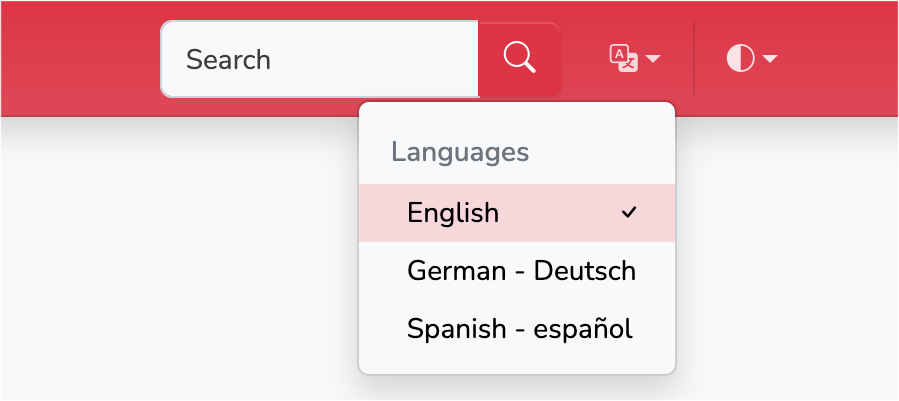
The localization widget displays three languages. Clicking on any of them would load the current URL in the selected language.
You could add a _build/html/index.html file with the following content to redirect to the default site:
<html>
  <script>
    window.location.href = "en/index.html"
  </script>
</html>